

A vehicle identification number can identify a vehicle, but it cannot show where a shipment is right now. Real-time vehicle transport tracking depends on location information shared through a carrier’s tracking system. A VIN alone does not provide live tracking.
For a clearer picture, follow shipment updates from pickup through transit to delivery. Transport providers commonly share updates when a vehicle is collected, during a multi-day trip, as the carrier enters the delivery region and when the driver approaches the destination. An ETA range is more useful than expecting an exact arrival time.
This guide explains how mobile and web-based tracking can show shipment activity, which pickup-to-delivery milestones to watch, and how traffic, weather, driver rest periods and transfer points can affect an ETA. You’ll learn what each update tells you and how to follow a vehicle’s progress with less guesswork.
Key Takeaways
- Learn how dispatch, driver and broker updates can help you follow a shipment, even when a live map isn’t available.
- Understand what GPS location data can show and why a vehicle identification number alone can’t reveal a vehicle’s live location.
- Follow the key steps from pickup to delivery, and use ETA ranges to plan around possible route or transfer delays.
- Compare mobile and web tracking views to find a practical way to stay informed throughout a vehicle move.
What are the Top Features to Look for in Fleet Tracking Software?
Useful fleet software brings location details together with clear updates from drivers, dispatch teams and brokers. Look for tools that make shipment progress and next steps easy to understand.
Driver and Dispatch Updates
A useful update names the event, such as vehicle pickup, a route delay or arrival near the destination. Drivers can share changes with dispatch, while brokers pass relevant information to customers. Look for one consistent update channel, clear timestamps and a named contact role. Driver behaviour monitoring can add context, while reports should distinguish recorded events from conclusions. For example, a sudden stop may reflect traffic conditions, not unsafe driving.
Customer Communication and Online Information
Customer-service updates should explain what changed and what happens next. A message saying the delivery ETA shifted because of a road closure is more useful than a status label alone. Web-based information can bring vehicle location, shipment status and driver details into one view. Check when each update was posted so you can distinguish current information from an older entry.
Tracking Rules, Costs and Update Frequency
For routes between Canadian provinces or across the US border, distinguish location updates from transport paperwork and border procedures. A tracking feed shows shipment progress, but it does not replace the carrier’s route documentation or border process. Tracking-service costs depend on the case and are provided after a quote request; factors include GPS hardware, platform access, vehicle count, reporting features and support. Updates are often milestone-based rather than delivered at a fixed interval. Common milestones include pickup, the middle of a multi-day trip, entry into the delivery region and the driver approaching the address.
Tracking Interruptions and Privacy Concerns
If updates stop, note the last timestamp and compare it with the shipment’s previous milestone. Then send dispatch the vehicle or shipment reference and request a status update. A tracking gap can mean the feed has not refreshed, not that the shipment has stopped. Location and driver details can reveal sensitive movement patterns. Limit account access to people managing the shipment, share tracking details only with intended recipients, and review who can view reports.
Can You Track A Vehicle Shipment?
Yes, real-time vehicle transport tracking is possible when a carrier shares GPS location data through a tracking system. A vehicle identification number identifies the vehicle, but it cannot show its live location on its own.
The information available depends on the carrier’s tracking setup and update process. A map pin gives a location reference; its timestamp and shipment status help show how current that information is.
GPS-Based Live Location Monitoring
GPS monitoring records a device’s position and sends location data to tracking software. The software can display the truck’s reported position on a map, helping customers follow the vehicle’s progress. Check the timestamp beside each position: a recent ping and an older one represent different moments. A map pin reflects reported device data, not visual confirmation of the vehicle.
Customers may also see route progress or shipment status, depending on the system. A vehicle does not transmit its location simply because it has a VIN; location information must come from a tracking device or another shared source.
App Location Pings and Dispatch Software
A driver’s mobile app can send location pings to dispatch software. Dispatch teams use the pings to monitor movement and coordinate route updates, while customer notifications can share relevant progress. Review the last ping time, shipment status and any accompanying note. These details help distinguish a fresh location from information that has not refreshed.
Some systems let dispatch set custom locations, such as a customer site or delivery yard. Reaching a saved point can record a milestone or trigger a notification. For help organizing a vehicle move, vehicle transport dispatching can coordinate shipment logistics.
Tracking Accuracy
Real-time vehicle transport tracking displays the latest location data sent to the system. Accuracy depends on the device, signal availability and refresh timing. A connection gap can leave an older position on the map, and the displayed location remains device data rather than confirmation of the vehicle’s exact position.
Read the timestamp alongside the map, then compare it with the latest dispatch update. GPS location and an ETA serve different purposes: one shows reported position, while the other helps with arrival planning. Together, they offer a practical way to follow shipment progress without treating every map pin as an exact arrival time.
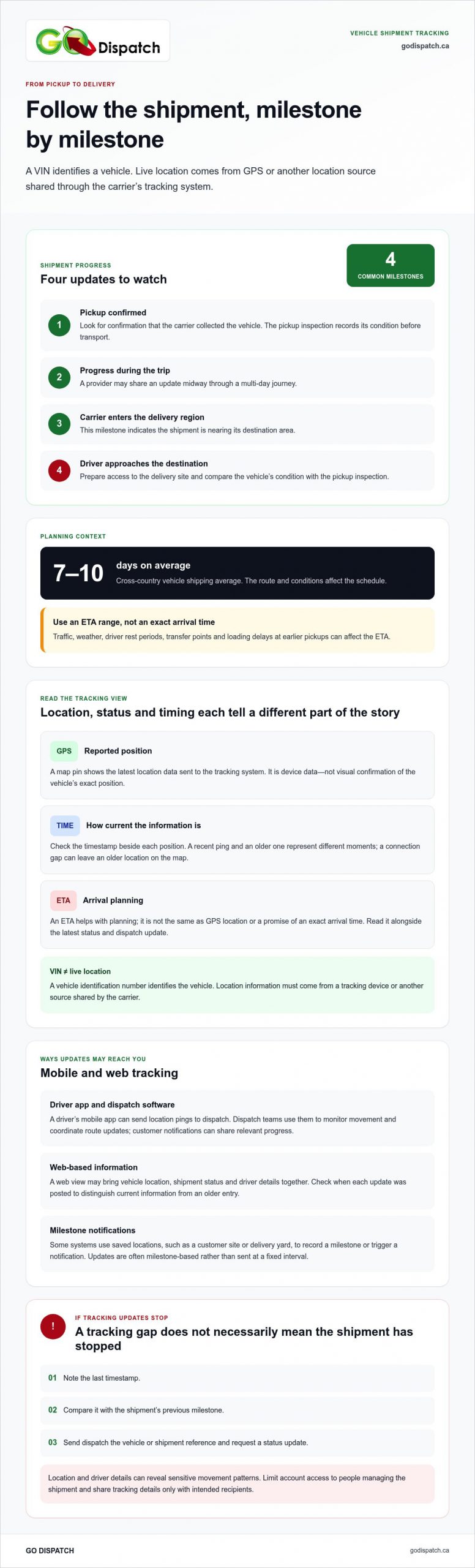
Pickup, in-transit, and delivery milestones
Milestones show what has happened and what comes next during a vehicle move. Read each status with its timestamp and the shipment’s ETA range.
Shipment Status Milestones
At pickup, look for confirmation that the carrier collected the vehicle. The pickup inspection records its condition before transport. During the trip, updates may mark progress midway, the carrier’s arrival in the delivery region and the driver’s approach to the destination.
Each status answers a different question: has the vehicle been collected, is it moving through the route, or is delivery approaching? If a carrier transports several vehicles, loading delays at earlier pickups can affect later ETAs. Cross-country vehicle shipping takes an average of 7 to 10 days, but the route and conditions affect the schedule.
Use updates to plan the handoff. When the driver approaches, arrange access to the delivery site and be ready to compare the vehicle’s condition with the pickup inspection. An ETA range supports planning better than an exact arrival time, especially when the route includes multiple stops.
Portal Updates Along the Journey
A shipment portal can organize status changes, timestamps and dispatch notes in one place. Check it at each milestone: after pickup, during the trip, as the carrier enters the delivery region and when the driver approaches. A timestamp helps distinguish a new update from an older status still displayed on screen.
Use the portal’s latest ETA range to coordinate the delivery location and the person receiving the vehicle. Road construction, congestion, lane closures and weather can affect progress. Driver rest periods and bottlenecks at transfer points or yards can also shift arrival timing. If a status has not changed, compare its timestamp with the last milestone before interpreting the map or ETA.
After delivery, review the vehicle’s condition and complete the handoff. Comparing the delivery inspection with the pickup record gives both parties a clear close to the shipment.
Mobile and web-based fleet tracking
Mobile and web views help different people follow vehicle movement during transport. A phone suits quick checks between tasks, while a larger web dashboard can make shipment details easier to compare across active operations.
On mobile, open the shipment record and review its latest status, timestamp and route information. For example, a customer waiting at a delivery site can check whether the carrier has entered the area. A dispatch team member can review the same shipment on a phone while coordinating other work.
A web dashboard is useful when fleet management involves several vehicles or shipments. Dispatch staff can compare records, spot which moves need attention and review updates in context. For example, if one shipment’s ETA changes while another remains on schedule, the web view helps keep the tasks and details separate.
Use either format with a consistent check routine: open the correct shipment, read the latest timestamp, review its status, then note any ETA change. This sequence helps prevent an older screen or the wrong vehicle record from shaping a delivery plan. Keep the shipment reference nearby when switching between phone and computer so you can return to the right record.
Choose the view that fits the task. A mobile screen supports a quick status check; a web dashboard supports broader review and coordination. Neither replaces a clear update from dispatch when a route change affects the handoff. Tracking helps organize information, while people explain what a delay means for the next step.
For help coordinating a vehicle move, explore one-stop transport dispatching and keep shipment planning organized.
GO DISPATCH: Car Transport
GO DISPATCH coordinates vehicle moves through Car Transport and its One-Stop Transport Dispatching service. It connects customers with suitable auto carriers and manages the logistics process, providing a practical way to arrange a vehicle shipment from pickup to delivery.
For a car move, share the shipment details and delivery requirements so GO DISPATCH can coordinate the transport. The service also handles truck, SUV and van transport. Clear shipment details help align pickup, delivery and communication expectations.
If you’re arranging a vehicle move and want support coordinating the transport, contact GO DISPATCH.
Plan your next vehicle move with confidence
Use real-time vehicle transport tracking as one part of a clear delivery plan. Before the move begins, gather the pickup and delivery details, identify who will receive the vehicle, and decide how shipment updates should reach you. That preparation helps turn a status change into a useful next step.
GO DISPATCH coordinates vehicle transport by connecting you with suitable auto carriers and managing the logistics process. Its offerings include car transport, truck transport, and SUV and van transport. This service gives you one point of coordination for arranging a vehicle move.
Share your transport needs and preferred handoff details to start the conversation. Contact GO DISPATCH about vehicle transport and take the next step toward an organized shipment.
Frequently Asked Questions
How Do You Find An Auto-Shipping Company That Offers GPS Tracking?
When arranging transport, clarify how location information is shared and what shipment details you’ll receive. For example, find out whether updates arrive through a web portal, mobile app or dispatch messages, and whether each entry includes a timestamp. A clear process should explain how to identify your shipment and who provides status updates. Keep your booking reference handy so dispatch can locate the correct move.
What Does “in transit” Mean For A Car?
“In transit” means the carrier has collected the car and it is travelling toward its delivery destination. It does not necessarily mean the vehicle is moving at the moment you see the status; the carrier may be making other pickups or stops. Use the status with its timestamp and latest ETA to understand the shipment’s progress and plan to receive the car.
Which car shipping companies in Canada offer live vehicle tracking?
Live location access depends on the tracking system used for the shipment and how updates are shared. GO DISPATCH provides vehicle transport dispatching, connecting customers with auto carriers and managing logistics. Its real-time order intake by a live person is different from a live map showing a vehicle’s location. When arranging transport, ask how shipment progress will be communicated.
How do I track a vehicle shipment using a carrier or broker?
Start with the booking reference or shipment number provided when the move was arranged. Use it in the carrier’s portal or app if provided, or share it with dispatch when requesting a status update. If a broker arranged the shipment, contact the broker’s dispatch team first; they can connect your request with the carrier handling the vehicle.
What do vehicle transport tracking services cost in Canada?
Tracking-service costs depend on the case and are provided after a quote request. Factors include GPS hardware, platform access, vehicle count, reporting features and support.